How OpenClaw Turns LLMs into Real-World Actions
February 24, 2026
Author: Oleksandr Piekhota, Principal Software Engineer at Teaching Strategies
Introduction
OpenClaw has earned a reputation as a "Jarvis" that does all the work for you. Is it indeed magic, or is there some underlying logic that can be decomposed and explained?
In this article, we will try to figure that out. Our aim is to provide a brief overview of the concepts available nowadays when using modern LLMs (Large Language Models) and how those concepts are integrated into the OpenClaw architecture. Using a real query, we are going to trace all the points where the query is involved and how that data is passed to its final goal.
We used to use many popular LLMs (such as ChatGPT, Gemini, Claude, etc) to help us do various things. Such use cases include but are not limited to explaining some concept, summarizing articles, extracting data from pdf, analyzing spreadsheets, etc. Our standard user experience is, however, limited to the vendor of our choice (OpenAi's ChatGPT for example), subscription type (Free, Pro, Max), or some features, like OpenAI's Browser Atlas, Claude Code, CLI tools etc. There are even some more advanced tools. I'd like to use OpenAI's ChatGPT example as they have some cool features there. For example, Codex allows you to connect a model to your github repository and make code reviews every time you do a pull request, or use deep research to explore some topic and collect the data together. But it is still worth saying that all those extra features are basically extensions on top of existing LLM solutions. So, basically, what unique OpenClaw proposes that made it so popular?
We could repeat the same conceptual terms as many other articles do to highlight what OpenClaw is, but it still will be unclear for the person who has never used AI tools. That's why we'd like to highlight several concepts must to understand first using ChatGPT as an example:
Knowledge cut-off date and prompt engineering?
An LLM’s training data is fixed - users cannot directly modify it. Don't believe it? Ask your model "What is the knowledge cut-off date?". Curious? If the base knowledge is locked, then how can we tell ChatGPT to tell us the current weather? Or how does it work when we ask to draw something and then suddenly the model starts rendering a picture instead of a text description?
Again, the model’s knowledge is limited to the data it was trained on, which only includes information available up to a specific cutoff date. We can't affect that at all. But what we can do is to explain the model with extra context to work with. We can share the problem, upload some files, provide some research data, and tell how to handle this or that scenario. Moreover, when solving some language translation or technical problems we can pass examples on how we would solve some similar issues. By doing so, we can help the model work with our specific problem more effectively.
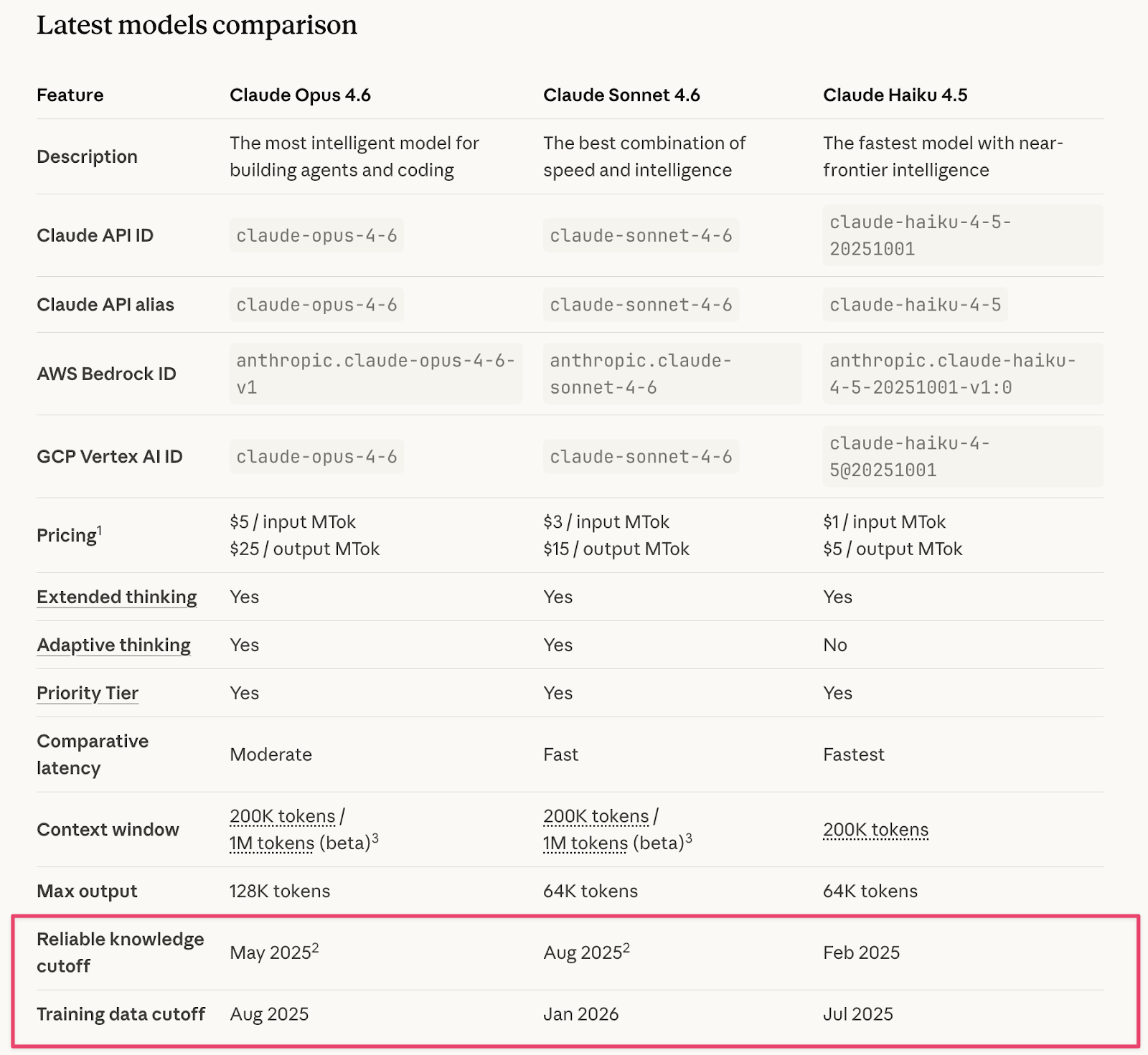
Image is taken from: https://platform.claude.com/docs/en/about-claude/models/overview
Tokens and Context Window
But you can't send your home library of 100 books and say: read all those books and be as smart as me :)
When you send a message to the model, the model processes text as tokens, which are common sequences of characters found in a set of text. There is a nice tool you can find here: https://platform.openai.com/tokenizer. Play with the tool to better understand the concept of tokens. Every model has its context window limit, basically the amount of data that the model can remember. If you exceed the context, the model will forget the information you send in the beginning. That's why when you have a long chat with the model, it sometimes forgets instructions mentioned in the beginning of the conversation.
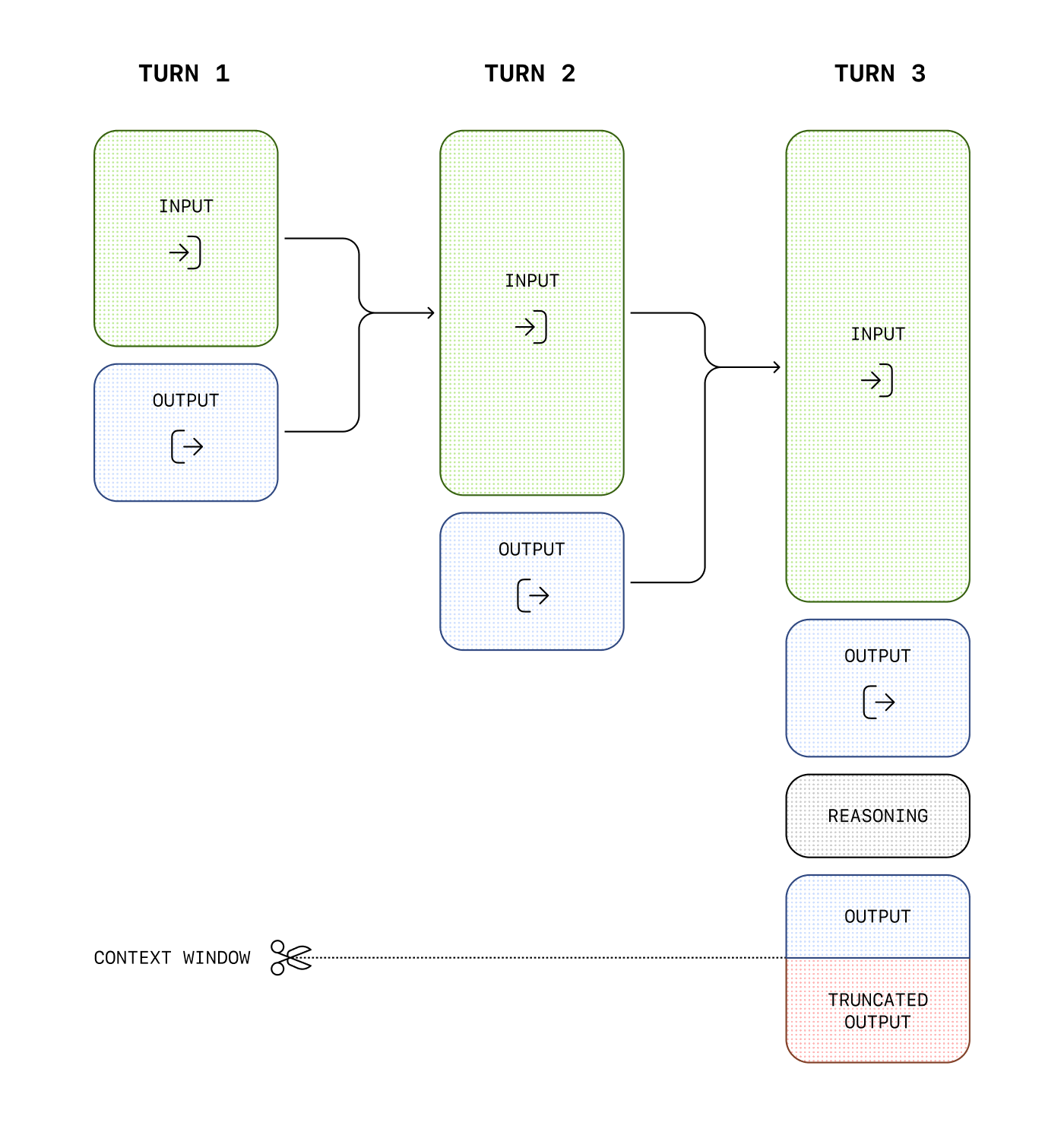
Image is taken from: https://developers.openai.com/api/docs/guides/conversation-state
Long-term memory and RAG
"Wait, I've seen online agents or chatbots that pretend to know more than average models can handle during the context window. How is that possible?" - you can ask.
To achieve such a result, engineers need to develop various workarounds. Luckily, most of such tools are already built-in as platform tooling. Basically, when a specific request is made by a user, the system understands a context, makes a separate request to extract relevant data from some storage, very often a vector database and inserts this related data as a part of the prompt. Extra data can be user specific, like user search history, or user preferences, or domain related information.
Function calling
When working with a model inside a browser, like sending queries inside ChatGPT's UI, it's not exactly obvious, as the UI does all the work behind the scenes, but if you try to make a call to ChatGPT API directly you can see quite interesting behaviour. Every time the model is asked something the model doesn't know, like current weather in Paris, it can return a structured request like ‘get_weather’ with ‘Paris’ as a parameter. Then the client's code can treat such a response as a function call, do a separate web search, figure out Paris temperature and return it back to the ChatGPT model. This will allow the model to answer the question naturally, like: The weather in Paris is cold, or rainy.
By combining such functions together, we can build very complex user behaviour. For example, ChatGPT Chat can search web pages, draw pictures, handle file analysis, inside the same app, but behind the scenes different processes are executed.
The Model Context Protocol (MCP)
While function calling itself is a very powerful concept, it still requires the integration layer to be architected, developed, and deployed. Such an approach on a scale creates many different problems. To address the issue Model Context Protocol (MCP) was introduced by Anthropic in 2024. It provides a universal, open standard for connecting AI systems with data sources, replacing fragmented integrations with a single protocol. The result is a simpler, more reliable way to give AI systems access to the data they need. With protocol introduced, Anthropic provided many SDKs, thus facilitating the community to build reusable connectors allowing models to make calls to systems such as databases (PostgreSQL), cloud services (AWS), desktop apps (Apple Calendar) and many other https://github.com/modelcontextprotocol/servers.
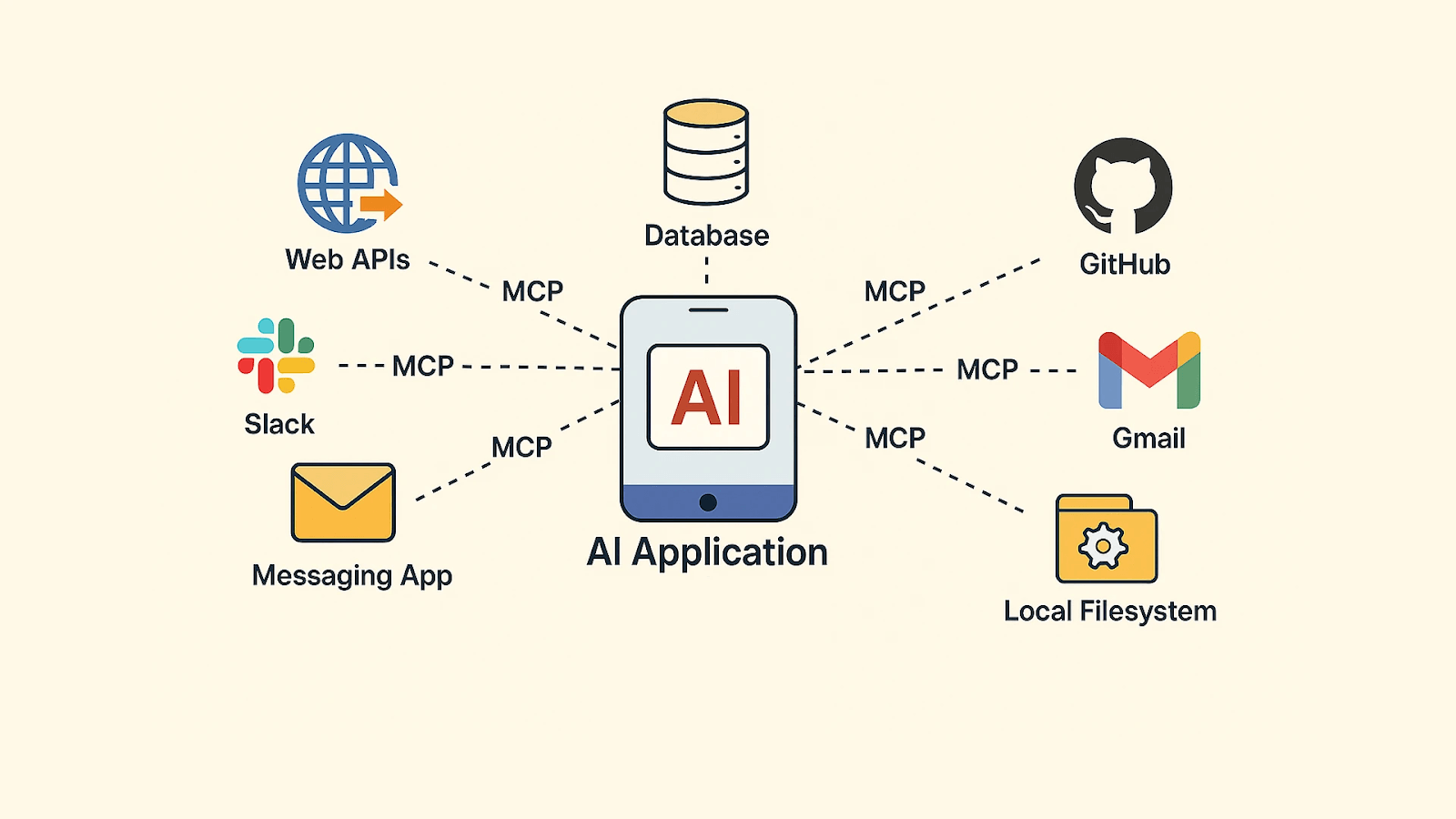
Image source: https://www.thinkstack.ai/glossary/model-context-protocol/
OpenClaw dive-in
This is where we can start talking about OpenClaw.
In its core OpenClaw is a Typescript CLI process running on your machine. This process exposes a gateway server, which is basically a core of the app. Think about it as a program running on your machine in the background and able to do different tasks. But calling it just a gateway would be too easy and simple.
The first gateway component to mention is Channels or Chat Channels https://docs.openclaw.ai/channels.
This is basically your interface to interact with the OpenClaw app. You basically don't need any complicated UI(but you do have a web interface + companion apps :) ) or chat or anything like that when you can send you queries via your favorite messenger, like Telegram, WhatsApp, etc. Channels feature basically allows you to connect any supported messenger, such as Telegram, Discord, Whatsapp, and have a direct access to all OpenClaw features.
Since it's "The AI that actually does things." it has to support modern LLMs, as you may already have figured out. And the list of supported LLMs is extensive. The tool supports pretty much all modern models, including self-hosted ones. So, basically, you can make it work with Claude or ChatGPT, or even Llama.
But what differs it from any other messenger Agent with ChatGPT connector? The gateway we mentioned earlier is basically a program running on your machine and has the permissions equal to the permissions of the user running it. This means the gateway can send your request to an AI model and then carry out the actions it suggests through the tools you’ve enabled on your computer.
But wait… We are talking about making web searches, running apps on your machine, periodically checking your inbox etc. How can LLM do that? Basically all of that is possible using the Model Context Protocol mentioned above. If you provide a proper bridge that will allow ChatGPT or Claude control your gmail inbox, then the AI model can generate appropriate tool requests for that.
OpenClaw has a list of tools available straight from the box, such as the Exec tool to execute commands from your terminal, WebTool to search information through the web, or BrowserControll tool via Chrome extension, etc https://openclaw.ai/integrations .
All of them are integrated into the app using the same MC protocol.
What about all those fancy videos I've seen on the internet? The tools mentioned above are just basic examples of things that you can do with the app, but not limited to. There are a tremendous amount of apps and features out there that can be integrated into the app, but the dev team possibilities are not infinite. Instead, they released https://clawhub.ai/ and made OpenClaw basically a platform where you can connect pretty much any tool with the MC protocol implemented: Trello, Slack, Zoho, Philips Hue and Home Automation. Haven't found something - feel free to develop your own integration.
But what if you want it to check something periodically? Do you need to message the app every 30 minutes? The answer is no. The gateway includes a built-in scheduler that can run tasks automatically at set intervals - for example, every hour. When you ask the app to perform something regularly, it saves that instruction and executes it according to the schedule you defined. For example, it can check the coin price every hour, compare it to your target level, and send you an alert if the threshold is reached.
Memory? Yes, those instructions, context, conversations, etc have to be remembered somehow so the app is doing the right thing for you. You can check more here: https://docs.openclaw.ai/concepts/memory#memory
But the main point is: OpenClaw memory is plain Markdown in the agent workspace. The files are the source of truth; the model only “remembers” what gets written to disk. Once you are aware of that, you can go and trace those files and see how it works behind the scenes. This can help you understand how it structures your data and how it's used in a communication with LLM of your choice.
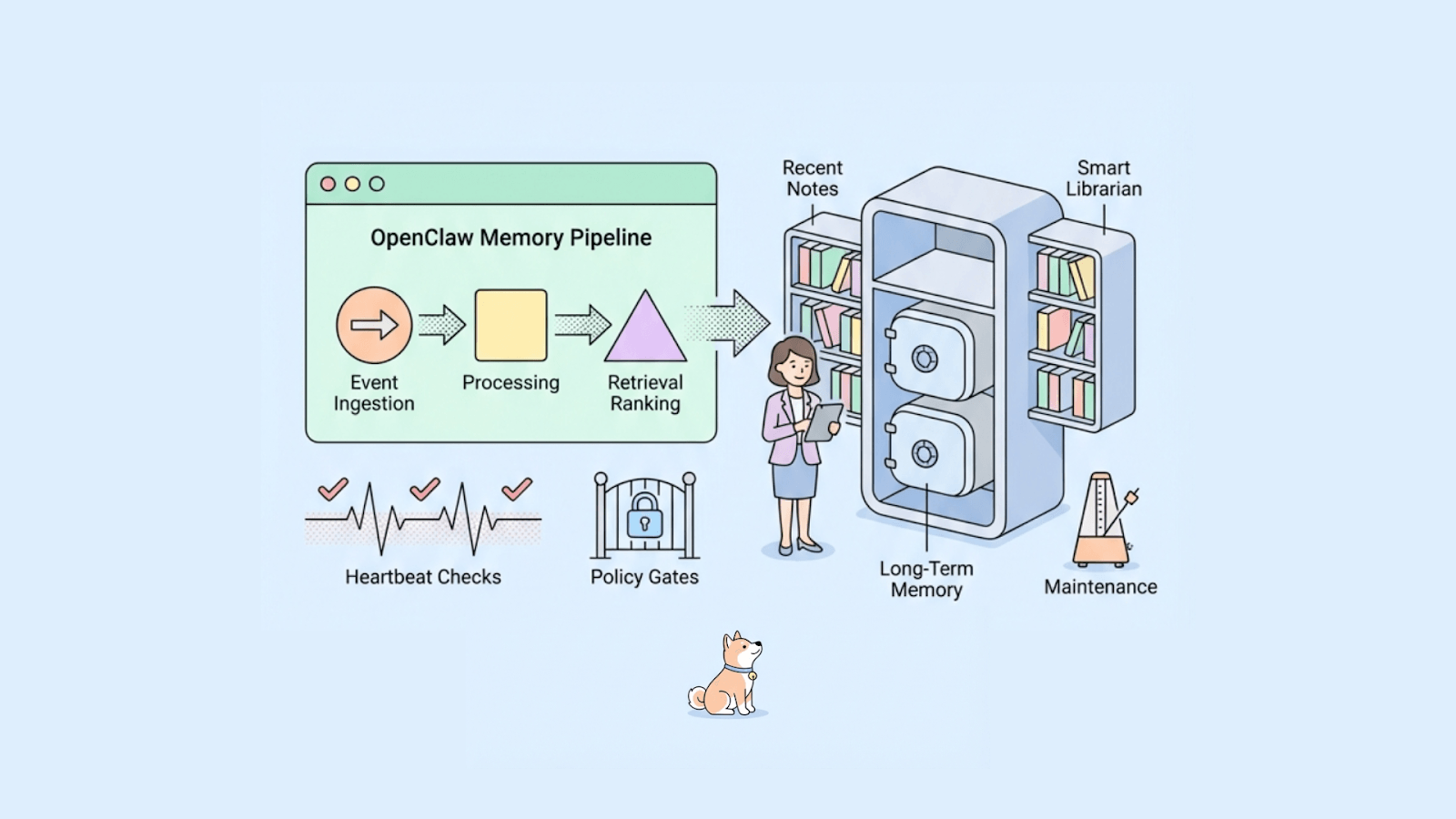
Image taken from: https://apidog.com/blog/openclaw-memory/
OpenClaw Architecture in One View
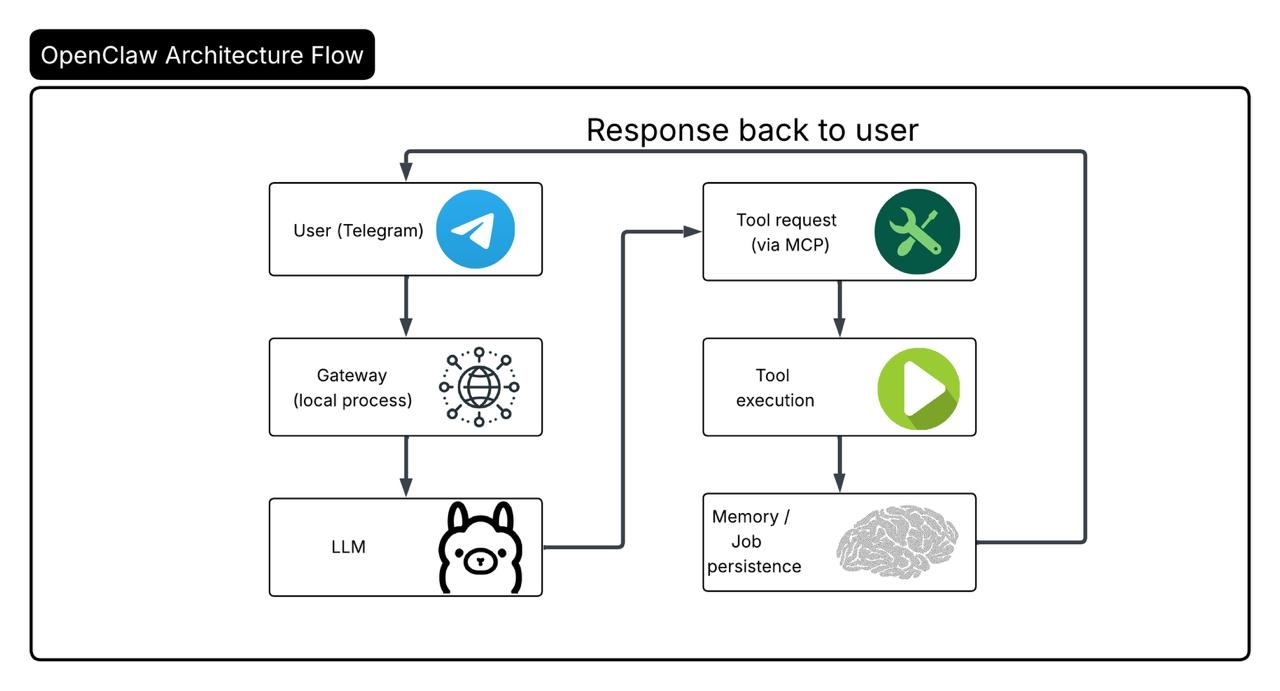
Real use case breakdown - Whales AI Crypto Follower
Let's break down a simple query example when we ask OpenClaw to actually make something useful for us.
Prerequisites:
Once you have the OpenClaw app installed, you need to connect it to one of the supported LLMs. We have found it very convenient to use codex agent api key(similarly you can use any other codex like LLM app) since it's gonna use your active subscription without paying separately for LLM API usage.
To send messages and interact with the OpenClaw gateway you need to set up one of the supported channels https://docs.openclaw.ai/channels.
For our example we are using the Telegram channel. You can find more information here: https://docs.openclaw.ai/channels/telegram.
At this point, OpenClaw can process your messages using an LLM and reply back to you. You can send a message hello via Telegram app and get some LLM replies. But what we actually want is to make OpenClaw go to the internet and search some information for us. There are several ways to make it work:
- By using OpenClaw's built-in web tools: web_search & web_fetch. It's a programmatic way to get the data. Just be aware that these are not browser automation. It uses external systems such as Brave Search API and Perplexity. For you it means no browser running on your machine, just some queries made to the external search system. But to use it you need to actually obtain an API key, so the system can work on your behalf. More info here: https://docs.openclaw.ai/tools/web#web-tools
-
Alternative would be using browser automations using the MCP protocol mentioned above. We found it convenient to use Chrome Browser Extension https://docs.openclaw.ai/tools/chrome-extension as one of the easiest ways to control browser. Moreover, this allows you to make a login to some systems and let OpenClaw have access to restricted website areas.
Once you have all of the prerequisites prepared you can start asking the agent to make actual work for you. It's important to say that you are free to use your own combinations of different connectors. That's where the real power lies for you as a user.
For example if we send a query like this:
[Run an hourly BTC/ETH whale-flow check focused on major transfers and exchange flows. Use web sources/tools available (e.g., Whale Alert dashboard and reputable trackers). Return a concise update with: (1) top 3-5 notable flows in the last hour, (2) quick interpretation (risk-on/risk-off/neutral), (3) any actionable watch levels for BTC/ETH. If there is no meaningful flow, say "No major whale-flow change in the last hour." Keep it under 8 bullets.]
FYI: You don't have to have such an advanced query. You can simply keep a conversation and discuss the desired outcome with the agent. The gateway automatically combines conversation history, memory, and job details before sending the request to the model. You can find the final result in a file called jobs.json under a path, something like ~/.openclaw/cron/jobs.json (can vary based on system).
The message is sent through the Telegram channel to the gateway for processing. Since we ask to keep this action as a repeatable, it will be processed as a scheduled task. Once everything is set and the agent is executing our action it begins making web queries or controlling your browser to gather the required information. If you want to see the actual research work on your screen it's recommended to use browser automation. + Brave API Search has a search limit so please be aware of that.
The actual result would be some like:
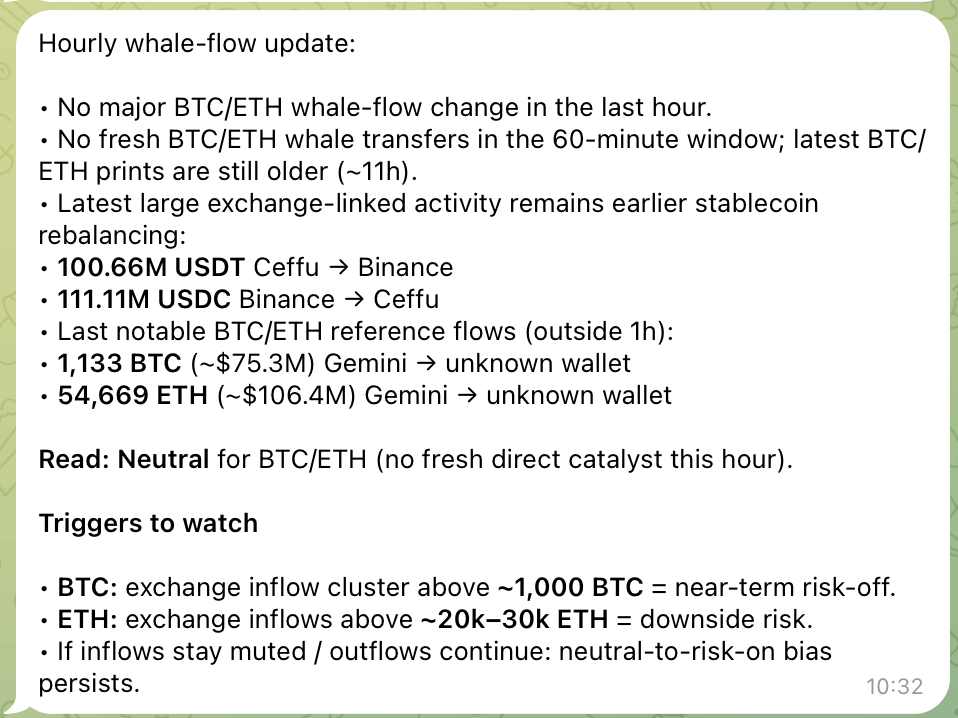
This example is not very suitable for real crypto actions as you need to consider much more params, services and points to put together, but it has to be good enough to get a basic understanding and try to automate your first crypto flow.
It's very important to highlight that this flow is read-only and doesn't do any actual trading work on your behalf. It's a very risky flow as some MCP connectors can expose security risks where your crypto keys can be stolen or the whole trading flow be inefficient due to AI hallucinations. Only do it if you know what you are doing and consider much more complicated flows where you are using only verified and secure connectors + AI agent actions either supervised by you or other AI models to reduce mistake chances.
OpenClaw may look like “Jarvis” on the surface, but there’s no magic behind it - just well-designed architecture. Large Language Models provide reasoning, the gateway manages communication, MCP connects tools, the scheduler runs tasks, and memory persists context. When these pieces work together, the result feels autonomous, but in reality it’s a structured flow: user request → model reasoning → tool execution → stored state → response. The power of OpenClaw isn’t mystery - it’s orchestration.